Steam Session Ticket Authentication
SpacetimeAuth supports authentication using Steam's Session Ticket system. This allows users to authenticate with your application using their Steam account. This method is particularly useful for gaming applications that want to distribute their applications on Steam.
Once a user authenticates with Steam, SpacetimeAuth will create an account for them in your SpacetimeAuth project and issue an ID token that your application can use to authenticate with SpacetimeDB. The ID token will contain claims with information about the user and game ownership, which you can use for authorization in your application.
The ID token will notably contain the following claims:
sub: The unique identifier for the user in SpacetimeAuthprovider_id: The unique identifier for the user in Steamlogin_method: The authentication provider (in this case, "steam")preferred_username: The user's Steam display namepicture: The URL to the user's Steam avatar (full size)steam_owned_games: An array of all the applications you published owned by the user on Steam
Creating a Steam Publisher Key
To use Steam Session Ticket authentication, you need to create a Steam Publisher Key in the Steamworks dashboard. This key will be used to verify the authenticity of the session tickets provided by Steam during the authentication process and to retrieve information about the user's owned games. To create a Steam Publisher Key, follow Valve's official documentation
Adding your Steam Publisher Key and allowed app IDs to SpacetimeAuth
Once you have your Steam Publisher Key, you need to add it to your SpacetimeAuth project along with the list of allowed app IDs that you want to check for ownership. You can do this in the SpacetimeAuth dashboard under the "Settings" section.
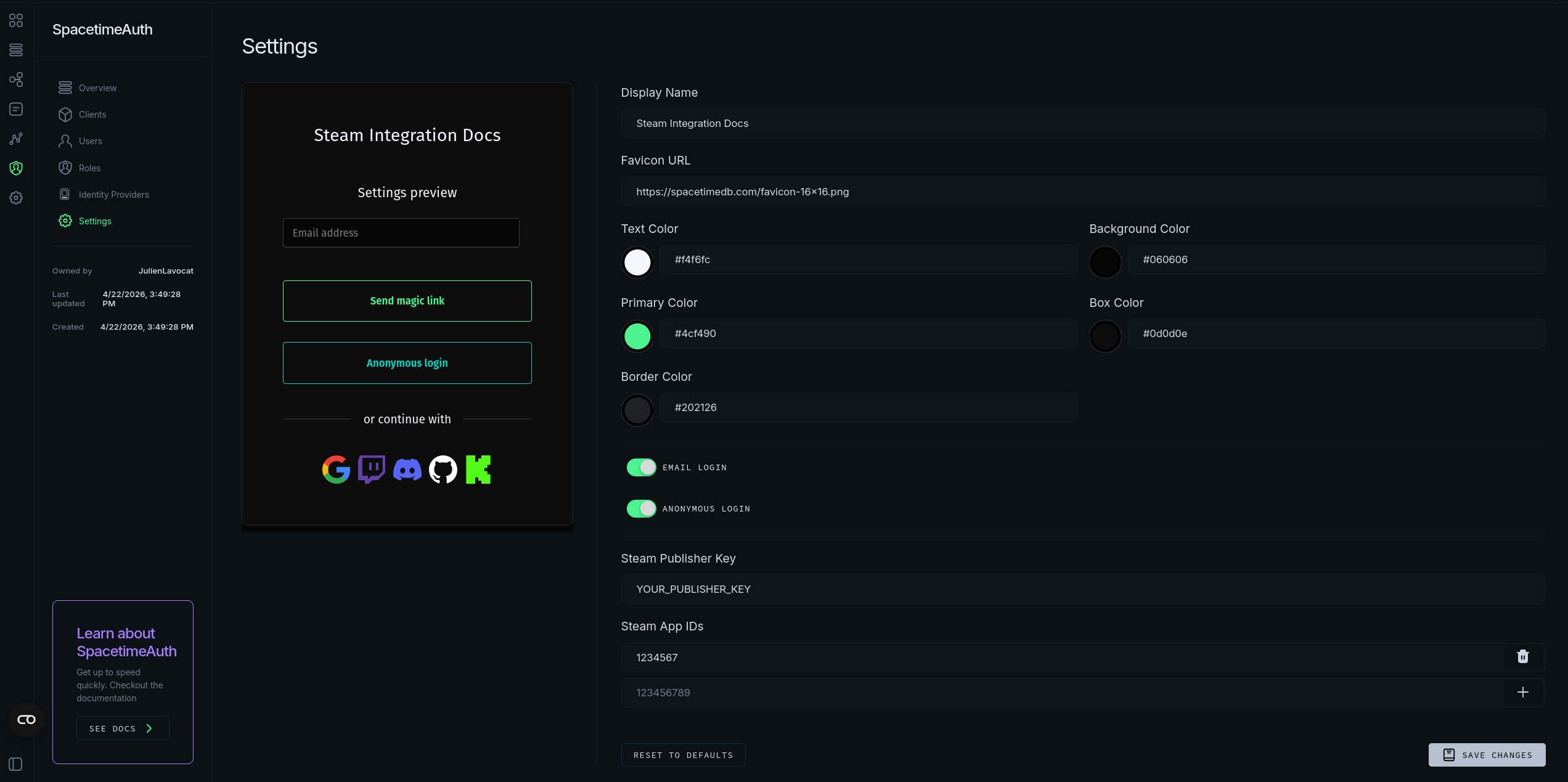
Any app IDs that will authenticate users through Steam Session Tickets must be added to the allowed app IDs list in SpacetimeAuth. This ensures that only session tickets issued for those specific app IDs will be accepted during authentication. This is an important security measure to prevent unauthorized access using session tickets from other applications. Make sure to add all the app IDs for the games or DLCs you want to check ownership for in your application.
Getting a Steam Session Ticket
Now that you've set up your Steam Publisher Key and allowed app IDs, you can implement the client-side logic to get a Steam Session Ticket and authenticate with SpacetimeAuth. You can use the Steamworks SDK to retrieve a session ticket for the user and then send it to your backend server for authentication.
Depending on the platform you're developing for, the process of obtaining a Steam Session Ticket may vary.
Here are some resources to help you get started with retrieving a Steam Session Ticket:
- Steamworks SDK documentation (C++/Unreal Engine)
- Steamworks .Net (C#/Unity)
- GodotSteam (Godot Engine)
- Steamworks.js (JavaScript/Node.js)
Make sure to request a session ticket with spacetimeauth as the identity parameter.
Exchanging the Steam Session Ticket for a SpacetimeAuth ID Token
Once you have the Steam Session Ticket, you can send it to the token endpoint of SpacetimeAuth to exchange it for an ID token that you can use to authenticate with SpacetimeDB.
Here is an example of how to exchange the Steam Session Ticket using curl:
curl -X POST https://auth.spacetimedb.com/oidc/token \
  -H "content-type: application/x-www-form-urlencoded" \
  -d "client_id=client_032xAh3p8o3zGzDghXsO5x" \
  -d "grant_type=urn:spacetimeauth:steam-ticket" \
  -d "steam_ticket=<YOUR STEAM TICKET>" \
  -d "steam_app_id=<APP ID FROM WHICH YOU REQUESTED THE TICKET>"
Checking App or DLC Ownership
You can check if a user owns a specific app or DLC by inspecting the steam_owned_games
claim in the ID token. This claim contains an array of all the applications you published
that the user owns on Steam. Each entry in the array includes the appid and a boolean
ownsapp indicating whether the user owns the app or not. You can use this information
to implement authorization logic in your application, such as granting access to
certain features or content based on game ownership.
#[derive(serde::Deserialize)]
struct SteamGame {
    appid: u64,
    ownsapp: bool,
}

#[derive(serde::Deserialize)]
struct CustomClaims {
    steam_owned_games: Vec<SteamGame>,
}

#[reducer(client_connected)]
pub fn connect(ctx: &ReducerContext) -> Result<(), String> {
    let jwt = ctx.sender_auth().jwt().ok_or("JWT required")?;
    let claims: CustomClaims = serde_json::from_slice(jwt.raw_payload().as_bytes())
        .map_err(|e| format!("Invalid JWT: {}", e))?;

    const APP_ID: u64 = 2717550;
    let owns = claims.steam_owned_games.iter().any(|g| g.appid == APP_ID && g.ownsapp);

    if !owns {
        return Err(format!("Unauthorized: does not own app {}", APP_ID));
    }
    Ok(())
}